- Online Attendance
- Online Payslips
- Join Unitus
- Course catalogue
- First cycle degree
- Communication, Technologies and Digital Culture
- Seed Production and Nursery Management
- Gastronomic and Welness Sciences, Culture and Politics
- Human Sciences
- Heritage Studies
- Modern Languages and Cultures
- Technologies for the sustainable management of livestock systems (LP-02_Livestock sector)
- Food and Wine Technology
- Scienze Naturali e Ambientali
- Sustainable management of forests and green spaces
- Economics of Innovation
- Biotechnologies
- Biological Sciences
- Design
- Landscape, Environmental Planning and Design
- Technologies for Green Buildings
- Industrial Engineering
- Business Economics
- Sport, Wellness, and Exercise in Natural Environments
- Agriculture and Environmental Sciences
- Environmental Biological Sciences
- Mountain Sciences
- Forestry and Environmental Sciences
- Natural and Environmental Sciences
- Political Science and International Relations
- Educational Sciences
- Educational Offer for Public Administration
- Second cycle degree
- Digital Information
- Economia Aziendale
- Circular Economy
- Digital Management of Agriculture and Mountain Areas LM69
- Digital Management of Agriculture and Mountain Areas LM73
- Management, Finance and Controlling
- Marketing and Quality
- Political Science, International Security Studies and Public Communication
- Mechanical Engineering
- Landscape Architecture
- Management of Gastronomic Sciences for Well-being
- Marine Biology and Ecology
- Experimental Biology and Bioinfomatics
- Agricultural and Environmental Sciences – MS
- Industrial Biotechnology for health and well-being
- Food Science and Human Nutrition
- Plant biotechnology for food and global health
- Conservation and Restoration of the Environment and Forest
- Forestry and Environmental Sciences
- Food Science and Technology
- Archaeology and Art History: Preservation and Enhancement
- Archaeology and Art History: Preservation and Enhancement LM89
- Modern Philology
- Languages and Cultures for International Communication
- Security and Human Rights
- Economics and Communication for Management and Innovation
- Single cycle degree
- First cycle degree
- University
- Our history
- Unitus Academy
- Professors
- University Organs
- Rector and Delegates
- Academic Senate
- Board of Directors
- Evaluation Unit
- University Quality Committee
- General Director
- The University Scientific Research Commission
- The Board of Auditors
- Comitato Unico di Garanzia
- Collegio di Disciplina
- Commissione Etica
- Student Consultative Committee
- University Sports Committee
- Student Representatives
- Establishment of University Organs - Elections
- Strategic Management Planning Documents
- The University Quality Assurance System
- Facilities and Services
- Locations and Campuses
- Services and Offices
- Information Technology and Telecommunications Service
- Rettore
- Legal Affairs and Negotiation Procedures Service
- General director
- Management Planning and Control Service
- Technical and Environmental Management Service
- Technical Service, Assets, Facilities, and Services
- Service for Employee Financial Benefits
- Human Resources Service
- Research, Technology Transfer, and Relations with Institution
- Accounting and Treasury Service
- Educational Offer and Student Services
- The University Integrated Centre - Cia
- Central Administration Organigram
- University Regulation
- Staff
- Atheneum Welfare
- Permessi
- Conventions
- Staff - Annual Cost
- Organizational Wellness
- Bandi di concorso e procedure selettive - Personale Tecnico-Amministrativo
- Registry Consultants and Employees
- Telelavoro
- Online Attendance - Circulars and Forms
- Training for Technical-Administrative Staff
- Trade Unions
- Servizi di Rete - VPN
- University Notice Board - Announcements
- Calls for Teachers
- External collaborations
- External Collaborations - CIA
- External Collaborations - Azienda Agraria
- CSALP External Collaborations
- CIRDER External Collaborations
- CINTEST External Collaborations
- CGA External Collaborations
- DAFNE External Collaborations
- DEB External Collaborations
- DEIM External collaborations
- DIBAF External collaborations
- DISUCOM External Collaborations
- DISTU External collaborations
- Calls for Scholarships
- Calls for PhDs
- Bandi Assegni di Ricerca
- Tenders for External Assignments
- Internal Assignments - Collaboration Requests
- Announcements for Technical-Administrative Staff Positions
- External Mobility - Notices from other Universities
- Official University Register - Regulatory Acts
- Albo Ufficiale d'Ateneo - RSU Elections
- International Ranking
- Cooperations
- Contacts and Certified e-mail
- Visual Identity
- Privacy
- Contact Directory
- Legal Notice
- Academics
- Academic Calendar
- Lessons timetable
- Recovering the Additional Formative Obligations (OFA)
- Services for students
- Student Associations
- Wi-fi
- Accommodation
- APP Studenti Unitus
- Calls for Students and Graduates
- Psychological Counselor
- LazioDISCO
- Student House and Canteen
- University Sports Center C.U.S.
- Unitus Email
- Tutoring Grants
- Supporto e Inclusione
- Student Advocate
- Certifications and Self-certifications
- Anti-Violence Center
- Urban gardens
- Insurance coverage
- Office 365
- GOMP Portal
- Changing course of study within the University
- Changing course of study within the University
- Didactic Laboratories
- Elective Learning Activities (AFS) Regulations
- Guide to Compiling Your Study Plan
- Moodle
- Student Portal
- Change of Study Program
- Suspend Academic Career
- Get Back to Studying
- Fees and contributions
- Forms
- Recognized Language Certifications
- Enrolment in subsequent years
- Part-time Students
- Internships
- Final Exam
- Placement
- Research
- Research and Innovation
- Research opportunities
- Servizi per il Personale di Ricerca
- Progetti di Ricerca
- PERCIVAL
- Progetto LIMONE
- EUROlakes Project
- TRUST Project
- Advanced analytical
- DISTINCT
- SPICE
- BIOTE(A)CH
- HARNESSTOM
- PRISMA4AFRICA
- BIOACTAM
- GREAT
- CASTANEOTURISMO
- IMPEACHMENT
- FILAGRU
- MASTER NUT
- LazioTom
- NEUTRALISE
- MULTIFRU
- PanWheatGrain
- TORBOCIP
- RECIPE
- SEMINARI IN TECNICHE APISTICHE
- RESYST
- ANCoSIC
- ROOTOLEA
- GRAEEN
- SO-LIVE
- INGECA
- TEHRA
- EnPiVeg
- NBFC
- ATENA
- MICROBIALIENI
- CIN-EAT
- CIRCE
- CON.LE.VIT
- CRITERIA
- CONSERVA
- INNOSHEEP
- MO-RES
- PCDBIO
- SheepMeat
- RECREO
- TETHYS PLUS
- Compact Tractor 4.0
- SUS-RISK
- OldButGold
- AGRITECH
- INTEGRI
- Modelli innovativi per applicazioni di scienze omiche avanzate
- MEDWHEALTH
- MILKEVIA
- TecBufala
- Progetto HARNESSTOM
- SMARTIES
- IMPRESA
- SOSVitEno
- EXPLOWHEAT
- BIOACT
- StarBirVino
- FERTI & GROW ACADEMY project
- WINERYFARMIN4.0
- GREENHORT
- GEOSCIENCES-IR
- SISSA3EFG
- CON.API.VIT
- EMERSCUT-CAR
- FORVECARDO
- OLIVIA
- SonninoNutraOil
- EyeLand
- TarHegh
- SUNRISE
- PROGNOSES
- Progetto MOSSA
- Progetto ORTE_CHOKE
- Progetto STABIRVINO
- Progetto ECOSUN
- Progetto EVER
- Progetto MAGNETOAGRI
- Progetto RE-WASTE
- Progetto RIVALSA
- Progetto RAISE
- Progetto CELO
- Progetto LEG-GER
- Progetto NANOPEPTOBAT
- Progetto MICOVIT
- Progetto BIOCHAR LATIUM
- Progetto TANA
- Progetto TECBUFALA
- Progetto BIOEDILCARBON
- Progetto MULTIFRU
- Progetto LAV.REG.LA
- Progetto OLIVIA
- Progetto PICUS
- Progetto AGARIC
- Progetto BIOPLAST
- Progetto CABIOED
- Progetto CINEAT
- Progetto EMESCCUT
- Progetto FELICEBIOTEVERE
- Progetto FORVECARDO
- Progetto GECORESP
- Progetto GRANLDEA TUSCIA
- Progetto INNONUTS
- Progetto INOSHEEP
- Progetto INVITENNET
- Progetto PCDBIO
- Progetto RUEWO
- Progetto SOLANUM 4G
- Progetto SOS VITENO
- VOISIN
- Progetto ZUCCHINO LASER
- Progetto SINBIO
- Progetto PARADISE
- Progetto GRANO GREEN
- Progetto ENVIOT
- Progetto: “RE.LA.C.S.”
- Progetto ALPHEUS
- Progetto CCVS
- Progetto CERESIS
- Progetto DIVERFARMING
- Progetto ENVRI-FAIR
- Progetto ECOBREED
- Progetto INNOVAFRICA
- Progetto INNOVAR
- Progetto LOWINFOOD
- Progetto RESEARCH
- Progetto PROTECTA
- Progetto STABLE
- Progetto SURE-FARM
- Progetto FOLIAGE
- Progetto MYSOIL
- Progetto SAMFIX
- Progetto SEEDFORCE
- Progetto SEAFOREST
- WINEgROVER
- Progetto Giustizia AGILE
- Patents
- Procedimento e dispositivo per rilevare condizioni di marcia durante la marcia
- Purovino
- Chitinolytic enzymes production by Penicillium janthinellus
- Disidratatore dinamico per ortofrutticoli basato su tecnologia IoT
- Sun Black™
- Varietà di carciofo (Cynara scolymus L.) denominate Donatello
- Italian Red Passion
- Varietà di carciofo (Cynara scolymus L.) denominate Raffaello
- Solenero
- Spin-Off
- Pubblicazioni Open Archive
- Talent Valorization and Attraction
- Call for Research Grants – SeedTalent
- Call for Expression of Interest (EOI) 2022
- Unitus Talent
- Call for visting scholars & professors
- Direct Call of Associate and Full Professor
- ERC Starting Grantees
- ERC Consolidator Grantees
- ERC Advanced Grantees
- Marie Sklodowska-Curie Actions
- Rita Levi Montalcini Grantees
- Distinguished Chiara Fama
- Expression of interest
- VQR - Research Quality Evaluation
- Department of Excellence
- Third Mission
- Post-graduation
- PhD opportunities
- Ongoing PhD Programs
- European and global markets law. Crisis, rights, regulation
- Economics, Management, and Quantitative Methods
- Engineering for Energy and Environment
- Ecology and sustainable management of environmental resources
- Science, technology and biotechnology for sustainability
- Plant and animal sciences
- History and cultural heritage
- Society in change: policies, rights and security
- Phd Admission
- PhD Regulations
- Doctoral Diplomas
- PhD International Mobility
- Forms for Doctoral Student Activities
- Doctoral Scholarships
- Budget for PhD Students research activities
- Periods of study and research stay
- Scholarship increase for stays abroad
- Ongoing PhD Programs
- Master's Degrees
- Unitus for Teaching
- Research Fellowship
- Postgraduate Scholarships
- Licensing of Professions
- Postgraduate Schools
- Advanced Training Courses
- Postgraduate Regulations
- PhD opportunities
- Departments
- DAFNE
- Information
- Quality Assurance
- Academics
- Education Offer
- How to enrol for degree courses
- Bachelor's degree and Master's degree DAFNE
- Class Calendar
- Exams and Graduate Theses
- Awards and Scholarships
- Master's Degrees - Pre-enrolment Application and Calendar of Interviews
- Tutoring Service
- Additional Educational Requirements
- Educational Workshops
- Curricular Internships and Other Choice Activities
- Research
- Social Impact
- International
- Orientation
- DEIM
- DEB
- DIBAF
- DIKE
- DISTU
- DISUCOM
- DAFNE
- International
- Profile
- Amministrazione Trasparente
- General Provisions
- Organizzazione
- Consulenti e collaboratori
- Personale
- Titoli di incarichi dirigenziali amministrativi di vertice
- Titoli di incarichi dirigenziali (dirigenti non generali)
- Dirigenti cessati
- Sanzioni per mancata comunicazione dei dati
- Posizioni organizzative
- Dotazione organica
- Personale non a tempo indeterminato
- Tassi di assenza
- Incarichi conferiti e autorizzati ai dipendenti (dirigenti e non dirigenti)
- Contrattazione collettiva
- Contrattazione integrativa
- Bandi di concorso
- Personale
- Performance
- Enti Controllati
- Attività e procedimenti
- Provvedimenti
- Bandi di gara e contratti
- Atti delle amministrazioni aggiudicatrici e degli enti aggiudicatari distintamente per ogni procedura
- Avviso sui risultati della procedura di affidamento diretto
- Avvisi relativi agli esiti delle procedure
- Trasparenza nella partecipazione di portatori di interessi e dibattito pubblico
- Procedure negoziate afferenti agli investimenti pubblici
- Verbali delle commissioni di gara
- Collegi consultivi tecnici
- Pari opportunità ed inclusione lavorativa nei contratti pubblici
- Fase esecutiva
- Concessioni e partenariato pubblico privato
- Affidamenti diretti di lavori, servizi e forniture di somma urgenza
- Affidamenti in house
- Elenchi di operatori economici riconosciuti e certificazioni
- Progetti di investimento pubblico
- Avvisi di preinformazione
- Delibera a contrarre
- Avvisi e Bandi
- Avvisi sui risultati della procedura di affidamento
- Avvisi sistema di qualificazione
- Affidamenti per somma urgenza
- Ulteriori informazioni
- Provvedimenti di esclusione e di ammissione
- Contratti
- Resoconti della gestione finanziaria dei contratti al termine dell'esecuzione
- Informazioni sulle singole procedure
- Informazioni sulle singole procedure in formato tabellare
- Polizze assicurative
- Atti delle amministrazioni aggiudicatrici e degli enti aggiudicatari distintamente per ogni procedura
- Sovvenzioni, contributi, sussidi, vantaggi economici
- Bilanci
- Beni immobili e gestione patrimonio
- Controlli e rilievi sull'amministrazione
- Servizi Erogati
- Pagamenti dell'amministrazione
- Opere pubbliche
- Pianificazione e governo del territorio
- Informazioni ambientali
- Strutture sanitarie private accreditate
- Interventi straordinari e di emergenza
- <a href="https://www.unitus.it/ricerca/progetti-pnrr/">Risultati PNRR</a>
- Altri contenuti
- Prevenzione della Corruzione
- Responsabile della prevenzione della corruzione e della trasparenza
- Regolamenti per la prevenzione e la repressione della corruzione e illegalità
- Relazione Responsabile della prevenzione della corruzione e della trasparenza
- Provvedimenti adottati dall'A.N.AC. ed atti di adeguamento a tali provvedimenti
- Atti di accertamento delle violazioni
- Segnalazioni di illecito – Whistleblowing
- Accesso civico
- Accessibilità e Catalogo di dati, metadati e banche dati
- Dati ulteriori
- Prevenzione della Corruzione
Home Academics Services for students Office 365
- Academic Calendar
- Lessons timetable
- Recovering the Additional Formative Obligations (OFA)
- Services for students
- Student associations
- Wi-fi
- Accommodation
- APP Studenti Unitus
- Calls for Students and Graduates
- Psychological counselor
- Cultural mediator
- LazioDISCO
- Student House and Canteen
- University Sports Center C.U.S.
- Unitus Email
- Benefits and Discounts for the Student Community
- Supporto e Inclusione
- Tutoring grants
- Supporto e Inclusione
- Student Advocate
- Certifications and Self-certifications
- Anti-Violence Center
- Urban gardens
- Insurance coverage
- Office 365
- GOMP Portal
- Changing course of study within the University
- Changing course of study within the University
- Didactic Laboratories
- Elective Learning Activities (AFS) Regulations
- Guide to Compiling Your Study Plan
- Moodle
- Student Portal
- Change of Study Program
- Suspend Academic Career
- Get Back to Studying
- Fees and contributions
- Forms
- Recognized Language Certifications
- Enrolment in subsequent years
- Part-time Students
- Internships
- Final Exam
- Placement
Under the terms of the CRUI/MICROSOFT agreement, the University provides free use of Microsoft Office 365 tools to Professors, Technical/Administrative Staff, and Students via their institutional email.
If student career ends or if staff terminate their legal relationship with the University, the right to use this service also ends, and users have 30 days to remove and/or save their content.
What the license includes
The Microsoft Office suite includes tools for study, productivity, communication, and collaboration:
- Office Applications: Word, Excel, PowerPoint, Outlook, and OneNote, available in desktop, web, and mobile versions; Access for Windows PC.
- Multi-device installation: Office applications can be used on up to 5 devices.
- Microsoft Teams: meetings, chat, and team collaboration.
- OneDrive and SharePoint: storage, sharing, and collaborative document editing.
- Windows Enterprise/Education: installation and activation of the Windows edition covered by the license, in compliance with Microsoft requirements and the license assigned by the University. Up to 5 eligible devices can be activated simultaneously per user.
How to obtain the license – STUDENTS
To activate access to Microsoft 365 Education, you must have your institutional email address @studenti.unitus.it.
- Go to the Microsoft 365 Education activation page.
- Enter your institutional email address @studenti.unitus.it and follow the on-screen instructions.
- If required, complete the email address verification using the message or code received in your institutional inbox.
- Complete the registration wizard or, if you already have a Microsoft Education account with an @studenti.unitus.it address, sign in.
Once completed, sign in to Microsoft 365 using the institutional account used for activation; your Microsoft password is the one chosen and set during registration.
How to use the license – PROFESSORS AND TECHNICAL/ADMINISTRATIVE STAFF
The Microsoft 365 account is automatically created and synchronized following the creation of your University user profile upon hiring. Independent registration is therefore not required.
Accessing the service
- Log in to Microsoft 365.
- Enter your institutional email address @unitus.it.
- If prompted, select “Work or school account”.
- Sign in using your University institutional credentials (the same ones used for email) and complete any required security verifications.
Once logged in, you will be able to use the applications and services available based on the assigned license.
Installing Office applications:
On workstations managed by the University, the installation is already included on the assigned PC.
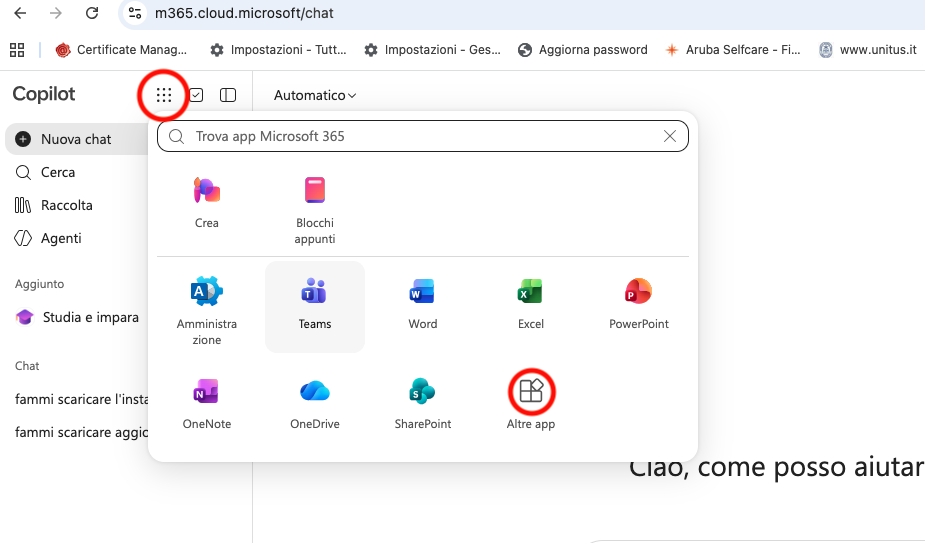
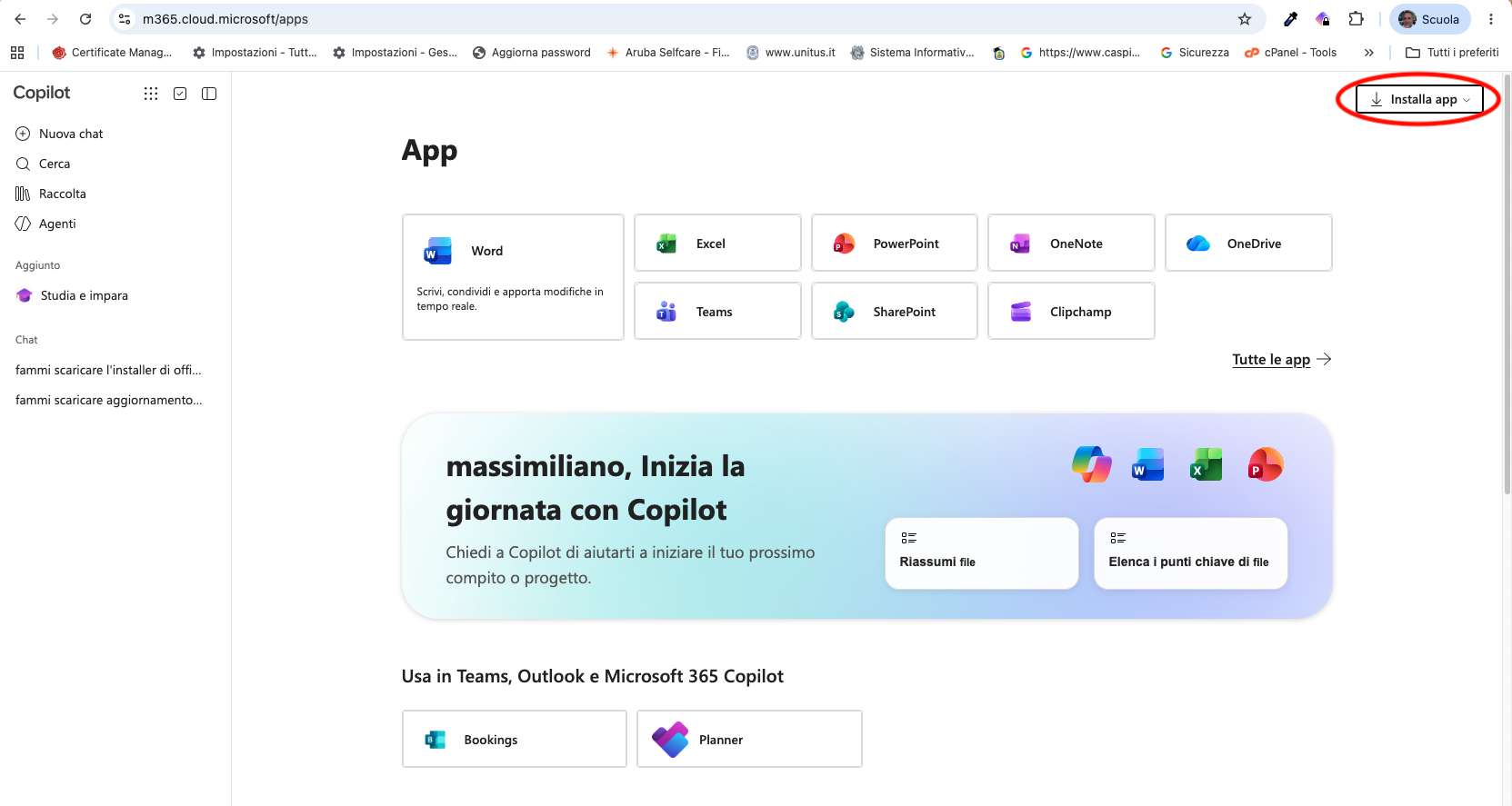
- Once authenticated in the Microsoft 365 portal, select “Install apps” and follow the instructions to download and install the package.
- When finished, open an application, such as Word or Excel.
- When prompted, sign in with your institutional account @unitus.it or @studenti.unitus.it to activate the license.
Warnings
For newly created user accounts, you may need to wait for synchronization to complete. If access continues not to work or the expected applications are not available, contact the designated IT representatives to check the status of your account and license assignment.
Access is granted exclusively through the institutional account; the availability of individual services depends on the permissions and configurations adopted by the University.
Technical support for the Office 365 suite is not provided by the IT and Telecommunications Service, which remains available only for issues related to license activation.